

Deadbeef compiled in Racy but seems to work well in Saluki.
http://www.smokey01.com/software/multim ... 5-i486.pet
Saluki

Typo. Should be pfix=ramsmokey01 wrote: I usually have two entries in my menu.lst file whether I'm using Grub or Grub4Dos. One entry loads Saluki normally and the other entry has pix=ram on the kernel line. This allows me to run Saluki, or any other Puppy, without using the save file.
It's also a good idea to test new applications with the pix=ram option. If it works then add it to adrive using the custom builder. Make sure adrive has been backed up first.
I am pointing this out to avoid inadvertently confusing beginners.
[b]Classic Opera 12.16 browser SFS package[/b] for Precise, Slacko, Racy, Wary, Lucid, etc available[url=http://terryphillips.org.uk/operasfs.htm]here[/url] :)
-
dennis-slacko531

- Posts: 100
- Joined: Wed 18 Jan 2012, 21:53
- Location: Oregon
- Contact:
Saluki before your LMDE
I tried the Mint Xfce over the weekend and while not bad, there's still root user issues that will prevent quick learning. That opens a big door for very able Saluki. I'm sure that's already considered but with some promotion perhaps the word will get out to a million or so Xfce fans/students. That's about all I wanted to say.
-
veronicathecow

- Posts: 559
- Joined: Sat 21 Oct 2006, 09:41
Excellent puppy
Hi Jemimah, firstly many thanks to you and the others for this puppy. I love puppy generally but always go back to PCLinuxOs because almost everything works out of the box (But it tends to run a bit slow even on new hardware 3ghz quad core)
I thought I would try a few different puppies for speed and ease of use and yours was the first.
I was going to pop back into PCLinuxOs but realised I felt so at home in your Puppy I would post from here instead. So far your puppy seems the most polished that i have tried so once again many thanks
Tony
I thought I would try a few different puppies for speed and ease of use and yours was the first.
I was going to pop back into PCLinuxOs but realised I felt so at home in your Puppy I would post from here instead. So far your puppy seems the most polished that i have tried so once again many thanks
Tony
settings Netbook launcher in saluki?
Ok, I have built a new personlalized saluki... But a strange behavior emerged: this one boots in a netbook launcher environment (tabbed desktop). I want to change it back to what it was but I can not find the icon for it in the control panel, nor do I know the terminal command for it.

Here is WinUSB, compiled in Saluki, http://en.congelli.eu/prog_info_winusb.html
I'm pulling this for the moment, it don't seem to be working as it should, I'll look at it some more before re-posting it, bummer!
Na, this just isn't going to play the game, pity, I could of made use of windows installer on usb.
I'm pulling this for the moment, it don't seem to be working as it should, I'll look at it some more before re-posting it, bummer!
Na, this just isn't going to play the game, pity, I could of made use of windows installer on usb.
[b]Carolina:[/b] [url=http://smokey01.com/carolina/pages/recent-repo.html]Recent Repository Additions[/url]
[img]https://dl.dropboxusercontent.com/s/ahfade8q4def1lq/signbot.gif[/img]
[img]https://dl.dropboxusercontent.com/s/ahfade8q4def1lq/signbot.gif[/img]

For people who want a simple and fast method of
MD5sum calculation and checking of their downloaded files
I made a right click package. It needs xclip to be installed as well
but it's not too big.
Available here
Instructions: Just put the MD5sum in clipboard (by selecting)
Then choose the right click menu option.
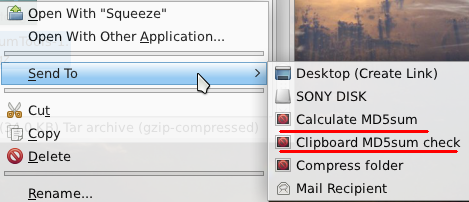
________________________________________________________
MD5sum calculation and checking of their downloaded files
I made a right click package. It needs xclip to be installed as well
but it's not too big.
Available here
Instructions: Just put the MD5sum in clipboard (by selecting)
Then choose the right click menu option.
________________________________________________________
Well the Goot translator application is now unusable even with babelfish..
http://blogs.msdn.com/b/translation/arc ... users.aspx
http://blogs.msdn.com/b/translation/arc ... users.aspx
[b]Carolina:[/b] [url=http://smokey01.com/carolina/pages/recent-repo.html]Recent Repository Additions[/url]
[img]https://dl.dropboxusercontent.com/s/ahfade8q4def1lq/signbot.gif[/img]
[img]https://dl.dropboxusercontent.com/s/ahfade8q4def1lq/signbot.gif[/img]

There is a MD5 checker right clicking the file, Properties > Digests with a copy to clipboard, but it appears to have a problem,greengeek wrote:Excellent idea!don570 wrote:For people who want a simple and fast method of
MD5sum calculation and checking of their downloaded files I made a right click package. It needs xclip to be installed as well
but it's not too big.
I can copy the MD5 the first time, but unable to if I select another file to check, it must be a bug.
[b]Carolina:[/b] [url=http://smokey01.com/carolina/pages/recent-repo.html]Recent Repository Additions[/url]
[img]https://dl.dropboxusercontent.com/s/ahfade8q4def1lq/signbot.gif[/img]
[img]https://dl.dropboxusercontent.com/s/ahfade8q4def1lq/signbot.gif[/img]
Another way to check the MD5SUM is to install gtkhash from the PPM if not already installed.
Open thunar
Select the Edit menu
Select Configure custom actions
Click on +
Enter a Name, EG: gtkhash
Add a Description, EG Check MD5
in command type: gtkhash %F
Select an icon
Now select the tab at the top called Appearance Condition and enter File Pattern: *.iso
Tick Other files
Click on OK
Right mouse click on an ISO file, select gtkhash, then click on Hash Button.
Simple and effective.
Open thunar
Select the Edit menu
Select Configure custom actions
Click on +
Enter a Name, EG: gtkhash
Add a Description, EG Check MD5
in command type: gtkhash %F
Select an icon
Now select the tab at the top called Appearance Condition and enter File Pattern: *.iso
Tick Other files
Click on OK
Right mouse click on an ISO file, select gtkhash, then click on Hash Button.
Simple and effective.
"everything but the kitchen sink" saluki
My apologies... I should not have asked questions so fast... Just for the fun of it I made an everything-but-the-Out house-sink saluki (with almost everything from the saluki repo installed). Everything except the games that is. Result in a giant iso to load in ram (over 1.1 GB). But it works.
My AsusEEE 1215n needs about 2 hrs to build it. Half of that is used for the creation of the adrive dir.
Jemimah is super!
Small point of criticism: if the iso is larger than ram, saluki gives up (can't boot). In lucid puppy that is not a problem, then not all the iso goes in ram.
My AsusEEE 1215n needs about 2 hrs to build it. Half of that is used for the creation of the adrive dir.
Jemimah is super!
Small point of criticism: if the iso is larger than ram, saluki gives up (can't boot). In lucid puppy that is not a problem, then not all the iso goes in ram.

Just a quick update. I'm still alive but totally exhausted. They have me flying all over the place and it's hard to concentrate on anything at this frenetic pace. Most of my off days are spent catching up on paper work and expense reports.
Next month I think I'll be in utah which should give me some stability but it is still (I think) three timezones away so I dunno how much free time I'll have.
Bear with me. Saluki is still on my mind.
Next month I think I'll be in utah which should give me some stability but it is still (I think) three timezones away so I dunno how much free time I'll have.
Bear with me. Saluki is still on my mind.
[url]http://saluki-linux.com[/url]
Stuff2read while building your adrive
BTW...An excellent ebook to read when your notebook creates your personalized saluki iso is Parmy Olson's book "We Are Anonymous: Inside the Hacker World of LulzSec, Anonymous, and the Global Cyber Insurgency". An epub version of it is widely available.
The aims and activities of these groups were not that inspiring (=>causing digital damage for fun, I like the Saluki scene and help creating/popularizing a useful free OS for fun much better, with the logistic benefit that it is legal), but the group sociology was/is definatley worth to be studied. And Olson writes very well!
The aims and activities of these groups were not that inspiring (=>causing digital damage for fun, I like the Saluki scene and help creating/popularizing a useful free OS for fun much better, with the logistic benefit that it is legal), but the group sociology was/is definatley worth to be studied. And Olson writes very well!
Mypaint
I've compiled Mypaint for Saluki, what a great drawing app, I see it mentioned here and there on the forum,
but it doesn't look like anyone has compiled it before, I could be wrong, so I had a go at building it,
works fine, I've posted it at http://saluki-linux.com/Forum/viewtopic.php?p=428#p428
I'm trying to do most of my posts at the new forum from now on, but it's a bit hard when most of the action is here,
well normally it is, though it has slowed some what, Hi Jemimah.
but it doesn't look like anyone has compiled it before, I could be wrong, so I had a go at building it,
works fine, I've posted it at http://saluki-linux.com/Forum/viewtopic.php?p=428#p428
I'm trying to do most of my posts at the new forum from now on, but it's a bit hard when most of the action is here,
well normally it is, though it has slowed some what, Hi Jemimah.
Last edited by Geoffrey on Fri 15 Jun 2012, 23:50, edited 1 time in total.
[b]Carolina:[/b] [url=http://smokey01.com/carolina/pages/recent-repo.html]Recent Repository Additions[/url]
[img]https://dl.dropboxusercontent.com/s/ahfade8q4def1lq/signbot.gif[/img]
[img]https://dl.dropboxusercontent.com/s/ahfade8q4def1lq/signbot.gif[/img]
Take time
jemimah .... Projects need to wait sometimes... Take care of yourself first. Sounds like many "new jobs" are a trial by fire these days (let's see how many fires can you put out before you burn out ... or blow up). Thanks for the update ... good to hear that you are OK just busy.. Thanks... May strength of the oak and flexability of the willow surround you .... KJ
Saluki is auto saving in manual save only mode
Saluki 22 is auto saving in manual save only mode. I have doing some on-line puppy forum posting and Saluki puts up a "saving" splash screen and goes thru. the cpu and usb activity sequence of a save (at least once every 10 minute) while I'm supposed to be in a "0" interval pupsaveconfig using mode 13 on a usbflash drive. I have not had this happen on another puppy version. Thanks ... KJ
Re: Saluki is auto saving in manual save only mode
Hi KJ, are you able to confirm that an actual save takes place? (maybe by adding a new program or something?? and seeing if that program survives a reboot?). I wonder if the save activity is some sort of "pseudo-save" rather than a real save?? (If such a thing is possible)KJ wrote:Saluki 22 is auto saving in manual save only mode. I have doing some on-line puppy forum posting and Saluki puts up a "saving" splash screen and goes thru. the cpu and usb activity sequence of a save (at least once every 10 minute)
Icyos video...Saluki is tops
http://www.youtube.com/watch?v=hOrQ5iYd ... ature=plcp
Saluki 022 Puppy Linux XFCE - #1 OS On The Planet
Chris.
http://www.youtube.com/watch?v=hOrQ5iYd ... ature=plcp
Saluki 022 Puppy Linux XFCE - #1 OS On The Planet
Chris.